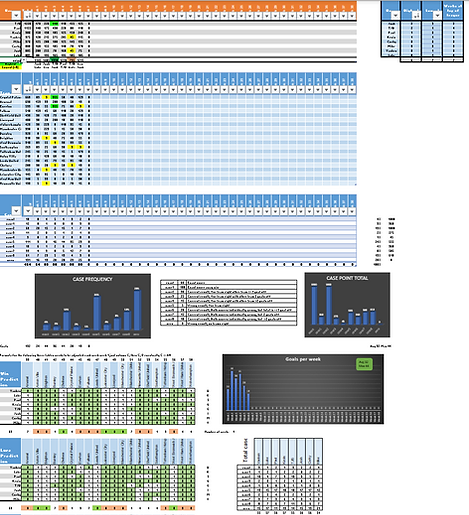
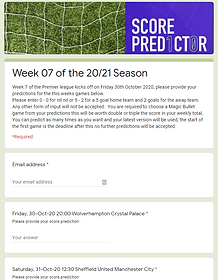
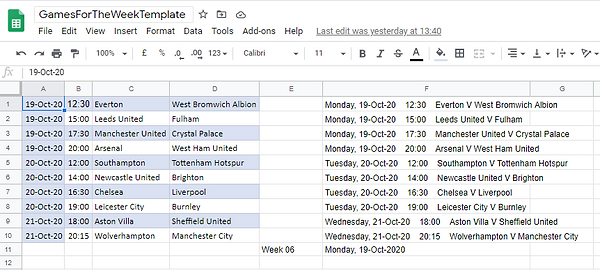
Rather than manually copying hundreds of values from player emails into Excel (which would take hours and cause mistakes!), we engineered a custom background Python scraping script.
The Python script logs into the commissioner's inbox, automatically identifies the structured prediction emails, parses the exact score values, formats them into standard spreadsheet CSV matrices, and outputs them—ready to be pasted directly into your Master Spreadsheet in under two seconds!
import imaplib
imaplib._MAXLINE = 400000
import email
import email.header
import datetime
from datetime import date, timedelta
from datetime import datetime
from dateutil import parser
import re
import os

import os.path
import clipboard


"""
v005 - tjb - 13apr18 - added Spam count
v006 - tjb - 13apr18 - fixed problematic passwords.
v007 - tjb - 13apr18 - tidied up output formats
v008 - tjb - 13apr18 - improved screen prints
v009 - tjb - 15may18 - added customer service mailbox
v012 - tjb - 15jun18 - realised older v10 and v11 existed so get the number right and added teachingLaw@
v001 - tjb - 26jun18 - build code to capture email addresses to send to comms for removing from mail list.
v002 - tjb - 02aug18 - added pathTemp to account for new version of python having different base folder.
v003 - tjb - 14feb19 - changed password for ICT mailbox
v004 - tjb - 15feb19 - changed csv file to only have email address no From text
v005 - tjb - 18feb19 - checked to eliminate any duplicates
v006 - tjb - 09aug19 - changed the program to extract predictor emails
v007 - tjb - 10aug19 - extracted raw predictions from email body need to decide how to handle these
v008 - tjb - 10aug19 - remove testFile writes in the loop for mail boxes (root)
v009 - tjb - 10aug19 - remove work done on HEADER as it is not used for predictor application
v010 - tjb - 17aug19 - code to catch "0 - 3" type of google mail entry ie spaces between -
v011 - tjb - 23aug19 - added while to trim the list pieces until it gets back to 10 long
v012 - tjb - 26aug19 - add week to saved file, cater for trailing spaces in form.
v013 - tjb - 23sep19 - closed testFile after the week number heading this meant the first email address can now be seen.
v014 - tjb - 24sep19 - improve output format to combine scores in a similar table to ss
v015 - tjb - 28sep19 - fixed issues with less than seven emails present
v016 - tjb - 05oct19 - started looking at ordering by person.
v017 - tjb - 06jan20 - getting LawVas included
v018 - tjb - 21feb20 - added message saying whos prediction is missing
v019 - tjb - 28feb20 - fixed error when count = 7 because now that is not the complete list.
v020 - tjb - 04apr20 - seting up readfy to handle magicBullet
v021 - tjb - 19jul20 - fixed missing reporting
v022 - tjb - 19jul20 - use what week number question to look at a email folder
v023 - tjb - 21aug20 - test for csv already there - so remove
v024 - tjb - 31aug20 - add week name to reported missing predictors
v025 - tjb - 29oct20 - removed references to lawVas
v026 - tjb - 03nov20 - make it work with new template form process
v027 - tjb - 02mar21 - capture long dash that cuased 9 to be inserted when scraping emails
v028 - tjb - 06mar21 - fixed isue when hypen is not surrounded by two spaces
v029 - tjb - 03aug21 - new season modifocations for 21_22
v030 - tjt - 12aug21 - changed Predictions for Week in csv file to remove repeat of the word Week
v031 - tjb - 17jan22 - add deadline to who is missing message
v032 - tjb - 08mar22 - put code in to work with capitalisation for input of week #
v033 - tjb - 29jul22 - change for new season
v034 - tjb - 29jul22 - realised using st, and th for dates now so needed to capture this so deadline code would work around line 320
v035 - tjb - 29jul22 - realised month is now the full month rather than three letter so needed to change this too.
v036 - tjb - 23sep22 - deal with month not defined error the ors needed to be fixed
v037 - tjb - 23oct23 - seeif I can put the folder into the control of s git repository
v038 - tjb - 17mar24 - used clipboard lib to paste message to cliboard
v039 - tjb - 16oct24 - added check to replace "    1" by " 1" because of a glitch in the week08 emails where the fulham AV game had too many
                        spaces in it and was adding a rogue line in msgString so causing problem when splitting into pieces.
v040 - tjb - 17dec24 - added message to say how many days the predictors have until deadline day
v041 - tjb - 24jan25 - remove all the silly code for getting previous day once I realised how datetime objects work
"""

#get name of path to the script file for opening files.
pathTemp = os.path.dirname(__file__)
weekNumber = input("What Week number is it? ")

if   len(weekNumber) != 6:
    print("That week number entry  was not the right length, please re-try \n ")
    test = "f"
else:
    weekNumber = weekNumber.title() # title capitises first letter and lowercases remaining partts of the string
    test = "t"


testFile = open(pathTemp + "/" + weekNumber + "predictorEmails.csv", "w")
testFile.write("Predictions for: " + weekNumber + "\n")
testFile.close()

emailFolder = "predictor/" + weekNumber

listMailboxes =[
['your_email@gmail.com', 'your_gmail_app_password'],

]

def days_between(d1, d2):
    d1 = datetime.strptime(str(d1), "%Y-%m-%d")
    d2 = datetime.strptime(str(d2), "%Y-%m-%d")
    return abs((d2 - d1).days)

longest = 42

def parse_mailbox(data):
    flags, b, c = data.partition(' ')
    separator, b, name = c.partition(' ')
    return (flags, separator.replace('"', ''), name.replace('"', ''))


def getNname(emailString):
    string = emailString
    if "tjb" in string or "bradytj" in string:
        nname = "TJB"
    elif "duke" in string:
        nname = "Corky"
    elif "luke" in string:
        nname = "Luke"
    elif "paul" in string:
        nname = "Paul"
    elif "michael" in string:
        nname = "Mike"
    elif "josh" in string or "jjbrady" in string:
        nname = "Josh"
    elif "kev" in string:
        nname = "Kev"
    elif "vdemirj" in string:
        nname = "Vasken"
    else:
        nname = "Unknown"
    return nname

def getNumberTotalEmail(folderName):
    # get number of entries in folder, this counts the emails and uses HEADER to find the
    # people who sent the emails
    folder = folderName
    totalMsgs = 0
    mailCollection = []
    games = []
    homeScores = []
    awayScores =[]
    listNnames = []
    magicBulletGame = []


    resp, data = obj.list('"{0}"'.format(folder), '*')
    if resp == 'OK':
        for mbox in data:
            flags, separator, name = parse_mailbox(bytes.decode(mbox))
            # Select the mailbox (in read-only mode)
            obj.select('"{0}"'.format(name), True)
            # Get ALL message numbers
            resp, msgnums = obj.search(None, 'ALL')
            mycount = len(msgnums[0].split())
            totalMsgs = totalMsgs + mycount
            #print(mycount)
            #print('{:<30} : {: d}\n'.format(name, mycount))
            for num in msgnums[0].split():
                #print(num)
                #data = obj.fetch(num, '(BODY.PEEK[HEADER])')
                #data = obj.fetch(num, '(RFC822)')
                #data = obj.fetch(num, 'ISO-8859-1')
                #msg = obj.message_from_string(data[0][1].decode('ISO-8859-1'))
                #msg = data[0][1].decode('ISO-8859-1')
                # msg is the email content
                msg = obj.fetch(num, '(RFC822)')
                msgString = str(msg)
                # print(msgString)


                fromPoint = msgString.find("Email address")

                endPoint  = msgString.find("Rgds ")
                msgString = msgString[fromPoint:endPoint]

                msgString = msgString.replace("\\t"," ")
                if " - " in msgString:
                    msgString = msgString.replace(" - "," ")

                #weird 9 predictions caused by wide dash in google form captured here seems to be \xe2\x80\x93
                if "xe2" in msgString:

                    position = msgString.find("xe2")
                    strip = msgString[position-1:position+11]
                    #print("got it in position ",position, " and it is ",strip)
                    msgString = msgString.replace(strip," ")


                # print(msgString)
                if "- " in msgString:
                    msgString = msgString.replace("- "," ")

                if " -" in msgString:
                    msgString = msgString.replace(" -"," ")


                if "-" in msgString:
                    msgString = msgString.replace("-"," ")

                # this check added to solve issue in Week08 where four spaces came in between date and time in msgString (see v039)
                if "   1" in msgString:
                    msgString = msgString.replace("   1"," 1")


                # print(msgString)
                pieces = msgString.split("    ")
                # what is happenning
                #for bits in pieces:
                #    print(bits)

                name = pieces[0]
                #introduce new function to use name to derive nick name
                nname = getNname(name)
                listNnames.append(nname)
                print("--")
                print(name)
                print(nname)
                print("--")
                pieces.pop(0)
                pieces.pop()

                while len(pieces) > 11:
                    pieces.pop()


                pathTemp = os.path.dirname(__file__)
                testFile = open(pathTemp + "/" + weekNumber + "predictorEmails.csv", "a")

                print(" ")
                print(name, nname)
                #print(pieces)
                #testFile.write("\n")
                testFile.write("\n" + name + "\n")
                testFile.write(nname + "\n")
                for parts in pieces:
                    if "Magic Bullet" in parts:
                        magicBulletPart = parts[-1]
                        if magicBulletPart == "0":
                            magicBulletPart = "10"
                        magicBulletGame.append(magicBulletPart)

                        testFile.write("Magic Bullet game," + magicBulletPart + "\n")
                        print("Magic Bullet Game is " + magicBulletPart)
                    else:
                        #print(parts)
                        partsAway = parts[-1] # last thing is away score
                        partsHome = parts[-3] # this grabs home score but assumes single digit and one space in between away and home?
                        partsHome = partsHome[0]
                        parts = parts.lstrip()
                        parts = parts[:-5]
                        parts = parts.replace(","," ")

                        games.append(parts)
                        homeScores.append(partsHome)
                        awayScores.append(partsAway)


                        testFile.write(parts + "," + partsHome + "," + partsAway + "\n")
                        print(parts + " " + partsHome + " " + partsAway)
                        #print("Home ", partsHome)
                        #print("Away ", partsAway)
                print(" ")


            return totalMsgs, games, homeScores, awayScores, listNnames, magicBulletGame

for inboxPair in listMailboxes:

    try:
        obj = imaplib.IMAP4_SSL("imap.gmail.com", 993)
        inbox = inboxPair[0]
        password = inboxPair[1]
        length = len(inbox)

        obj.login(str(inbox), str(password))
        obj.select('Inbox')
        obj.search(None,'ALL')

        # Count the INBOX unread emails
        status, response = obj.status('INBOX', "(UNSEEN)")
        unreadcount = str(response[0].split()[2])
        unreadcount = unreadcount.strip('\'b)')

        count, games, homeScores, awayScores, listNnames, magicBulletGame = getNumberTotalEmail(emailFolder)

        #print(magicBulletGame)

        missing = ""
        if "TJB" in listNnames:
            tjbNum = listNnames.index("TJB")
            print("TJB is " + str(tjbNum))
        else:
            missing = missing + "TJB, "

        if "Corky" in listNnames:
            corkNum = listNnames.index("Corky")
            print("Corky is " + str(corkNum))
        else:
            missing = missing + "Corky, "

        if "Luke" in listNnames:
            lukeNum = listNnames.index("Luke")
            print("Luke  is " + str(lukeNum))
        else:
            missing = missing + "Luke, "

        if "Mike" in listNnames:
            mikeNum = listNnames.index("Mike")
            print("Mike is " + str(mikeNum))
        else:
            missing = missing + "Mike, "

        if "Paul" in listNnames:
            paulNum = listNnames.index("Paul")
            print("Paul is " + str(paulNum))
        else:
            missing = missing + "Paul, "

        if "Josh" in listNnames:
            joshNum = listNnames.index("Josh")
            print("Josh is " + str(joshNum))
        else:
            missing = missing + "Josh, "

        if "Kev" in listNnames:
            kevNum = listNnames.index("Kev")
            print("Kev is " + str(kevNum))
        else:
            missing = missing + "Kev, "

        if "Vasken" in listNnames:
            vaskenNum = listNnames.index("Vasken")
            print("Vasken is " + str(vaskenNum))
        else:
            missing = missing + "Vasken, "

            # finding one day before first game 24 hours
            # jan 31, feb 28, mar 31, apr 30, may 31, jun 30, jul 31, aug 31, sep 30,  oct  31, nov 30, dec 31
        deadline = games[0].split()
        firstMatchDay = deadline[0] + deadline[1] + deadline[2] + deadline[3]

        # convert the firstMatchDay date to a datetime object
        dateTimeFMD = parser.parse(firstMatchDay)
        dateTimeDL = dateTimeFMD - timedelta(days=1)
        dateTimeDL = dateTimeDL.date() # make sure only the date is here and no time element

        print("\nFirst match day is ", dateTimeFMD.strftime("%A %d %b %y"))
        print("Deadline    day is ", dateTimeDL.strftime("%A %d %b %y"))
        #print("\n")


        #print(dateTimeDeadline)
        #print(datetime.now())
        todays_date = datetime.now().date() # make sure only the date is here and no time element
        difference = abs(dateTimeDL - todays_date).days
        # difference = difference + 1
        print("difference is ", difference)

        # print("Deadline is " + message + " so you have " + str(difference) + " days!")
        #delta = days_between(dateTimeDeadline, datetime.now())
        #print(delta)

        if count < 8:
            if count  == 7:
                missing = missing[:-2]

                if difference >1:
                    print("\nMissing",weekNumber,"Predictor is: " + missing + ". \nThe deadline is " + str(dateTimeDL) + " \nYou have " + str(difference) + " days before deadline day!\n")
                    cliptext = "Missing " + weekNumber + " Predictor is: " + missing +  ". \nThe deadline is " + str(dateTimeDL) + " \nYou have " + str(difference) + " days before deadline day!\n"
                elif difference == 1:
                    print("\nMissing",weekNumber,"Predictor is: " + missing + ". \nThe deadline is " + str(dateTimeDL) + " \nYou have " + str(difference) + " day before deadline day!\n")
                    cliptext = "Missing " + weekNumber + " Predictor is: " + missing +  ". \nThe deadline is " + str(dateTimeDL) + " \nYou have " + str(difference) + " day before deadline day!\n"
                elif difference == 0:
                    print("\nMissing",weekNumber,"Predictor is: " + missing + ". \nThe deadline is " + str(dateTimeDL) + " \nYou are on deadline day!\n")
                    cliptext = "Missing " + weekNumber + " Predictor is: " + missing +  ". \nThe deadline is " + str(dateTimeDL) + " \nYou are on deadline day!\n"

                clipboard.copy(cliptext)

            else:
                missing = missing[:-2]

                if difference >1:
                    print("\nMissing",weekNumber,"Predictors are: " + missing + ". \nThe deadline is " + str(dateTimeDL) + " \nYou have " + str(difference) + "  days before deadline day!\n")
                    cliptext = "Missing " + weekNumber + " Predictors are: " + missing +  ". \nThe deadline is " + str(dateTimeDL) + " \nYou have " + str(difference) + " days before deadline day!\n"
                elif difference == 1:
                    print("\nMissing",weekNumber,"Predictors are: " + missing + ". \nThe deadline is " + str(dateTimeDL) + " \nYou have " + str(difference) + " day before deadline day!\n")
                    cliptext = "Missing " + weekNumber + " Predictors are: " + missing +  ". \nThe deadline is " + str(dateTimeDL) + " \nYou have " + str(difference) + " day before deadline day!\n"
                elif difference == 0:
                    print("\nMissing",weekNumber,"Predictors are: " + missing + ". \nThe deadline is " + str(dateTimeDL) + " \nYou are on deadline day!\n")
                    cliptext = "Missing " + weekNumber + " Predictors are: " + missing +  ". \nThe deadline is " + str(dateTimeDL) + " \nYou are on deadline day!\n"

                clipboard.copy(cliptext)


        #obj.select('badEmailAddress')
        #sent = len(list_mailbox_content(obj, filter))

        #obj.select('badEmailAddress')
        #sentcount, mailCollection = mailbox_counts(obj, 'badEmailAddress')

        print(inbox + (longest -length) *" " + " OK")
        print("Number of emails is " + str(count))

        listOfNames = "Games,"
        for i in range(count):
            listOfNames = listOfNames + listNnames[i] + ",,"

        #print("ListOfNames is: " + listOfNames)


        testFile = open(pathTemp + "/" + weekNumber + "predictorEmails.csv", "a")
        testFile.write("\nPredictions for: " + weekNumber + "\n")
        if count == 8:
            testFile.write("Games,TJB,,Josh,,Luke,,Corky,,Mike,,Kev,,Paul,,Vasken\n")
        else:
            testFile.write(listOfNames + "\n")

        for i in range(10):
            if count == 8:
                testFile.write(games[i] + "," + homeScores[(tjbNum*10)+i] + "," + awayScores[(tjbNum*10)+i] + "," + homeScores[(joshNum*10)+i] + "," + awayScores[(joshNum*10)+i] + "," + homeScores[(lukeNum*10)+i] + "," + awayScores[(lukeNum*10)+i] + "," + homeScores[(corkNum*10)+i] + "," + awayScores[(corkNum*10)+i]  + "," + homeScores[(mikeNum*10)+i] + "," + awayScores[(mikeNum*10)+i]  + "," + homeScores[(kevNum*10)+i] + "," + awayScores[(kevNum*10)+i]  + "," + homeScores[(paulNum*10)+i] + "," + awayScores[(paulNum*10)+i] + "," + homeScores[(vaskenNum*10)+i] + "," + awayScores[(vaskenNum*10)+i] +"\n")
            if count == 7:
                testFile.write(games[i] + "," + homeScores[i] + "," + awayScores[i] + "," + homeScores[10+i] + "," + awayScores[10+i] + "," + homeScores[20+i] + "," + awayScores[20+i] + "," + homeScores[30+i] + "," + awayScores[30+i]  + "," + homeScores[40+i] + "," + awayScores[40+i]  + "," + homeScores[50+i] + "," + awayScores[50+i] + "," + homeScores[60+i] + "," + awayScores[60+i]+"\n")
            if count == 6:
                testFile.write(games[i] + "," + homeScores[i] + "," + awayScores[i] + "," + homeScores[10+i] + "," + awayScores[10+i] + "," + homeScores[20+i] + "," + awayScores[20+i] + "," + homeScores[30+i] + "," + awayScores[30+i]  + "," + homeScores[40+i] + "," + awayScores[40+i]  + "," + homeScores[50+i] + "," + awayScores[50+i] +"\n")
            if count == 5:
                testFile.write(games[i] + "," + homeScores[i] + "," + awayScores[i] + "," + homeScores[10+i] + "," + awayScores[10+i] + "," + homeScores[20+i] + "," + awayScores[20+i] + "," + homeScores[30+i] + "," + awayScores[30+i]  + "," + homeScores[40+i] + "," + awayScores[40+i] +"\n")
            if count == 4:
                testFile.write(games[i] + "," + homeScores[i] + "," + awayScores[i] + "," + homeScores[10+i] + "," + awayScores[10+i] + "," + homeScores[20+i] + "," + awayScores[20+i] + "," + homeScores[30+i] + "," + awayScores[30+i] +"\n")
            if count == 3:
                testFile.write(games[i] + "," + homeScores[i] + "," + awayScores[i] + "," + homeScores[10+i] + "," + awayScores[10+i] + "," + homeScores[20+i] + "," + awayScores[20+i] + "\n")
            if count == 2:
                testFile.write(games[i] +"," + homeScores[i] + "," + awayScores[i] + "," + homeScores[10+i] + "," + awayScores[10+i] +"\n")
            if count == 1:
                testFile.write(games[i] +"," + homeScores[i] + "," + awayScores[i] +"\n")
        # to add magic game number if less than all predictors have emails
        if count ==8:
            testFile.write("Magic Bullet Games," + magicBulletGame[tjbNum] + ",," + magicBulletGame[joshNum] + ",," + magicBulletGame[lukeNum] + ",," + magicBulletGame[corkNum] + ",," + magicBulletGame[mikeNum] + ",," + magicBulletGame[kevNum] + ",," + magicBulletGame[paulNum]+ ",," + magicBulletGame[vaskenNum])

        if count ==7:
            testFile.write("Magic Bullet Games," + magicBulletGame[0] + ",," + magicBulletGame[1] + ",," + magicBulletGame[2] + ",," + magicBulletGame[3] + ",," + magicBulletGame[4] + ",," + magicBulletGame[5] + ",," + magicBulletGame[6])

        if count ==6:
            testFile.write("Magic Bullet Games," + magicBulletGame[0] + ",," + magicBulletGame[1] + ",," + magicBulletGame[2] + ",," + magicBulletGame[3] + ",," + magicBulletGame[4] + ",," + magicBulletGame[5] )

        if count ==5:
            testFile.write("Magic Bullet Games," + magicBulletGame[0] + ",," + magicBulletGame[1] + ",," + magicBulletGame[2] + ",," + magicBulletGame[3] + ",," + magicBulletGame[4] )

        if count ==4:
            testFile.write("Magic Bullet Games," + magicBulletGame[0] + ",," + magicBulletGame[1] + ",," + magicBulletGame[2] + ",," + magicBulletGame[3])

        if count ==3:
            testFile.write("Magic Bullet Games," + magicBulletGame[0] + ",," + magicBulletGame[1] + ",," + magicBulletGame[2] )

        if count ==2:
            testFile.write("Magic Bullet Games," + magicBulletGame[0] + ",," + magicBulletGame[1])

        if count ==1:
            testFile.write("Magic Bullet Game," + magicBulletGame[0] )

        testFile.close()
        #print(collection)
        #print("badEmailAddress sent  is " + str(sent))
        #print("badEmailAddress count is " + str(counts))


        #testFile.write(inbox + "," + str(count) + "\n")


    except imaplib.IMAP4.error:
        print("\n" + inbox + " Log in failed.\n")


testFile.close()